Issue:
Sometimes scheduled jobs are send when the datacubes are not up to date. The problem is that the report contains the same data as the day before.
Solution:
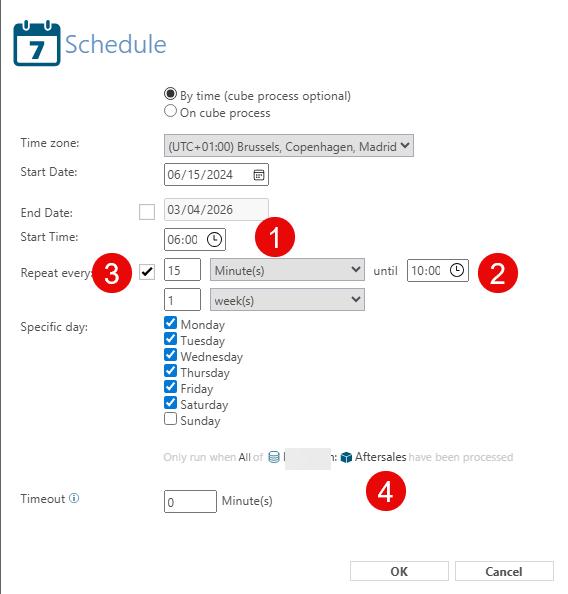
You can prevent this by adding the following paramaters to the job.
1. Start Time (From this time Targit is starting to send the report
2. Unil Time (Till this time Targit is trying to send the report)
3. Repeat every xx minutes (till until time)
4. Only Run when All ....
In this part of the setup selection you can select the datacube on which the report is based. Standaard we always select all cubes, sometimes a report contains data from all cubes. When you select all cubes the system will wait till all cubes are up-to-date before sending the mail.
Important:
After setting up save the job and run it once manually by hand, because the report must have a first send date. (Left mouse on job and choose Run)